
S for Switch Voice Free2.72 - Get APK
You'll be able to download in few seconds.
Publisher Description
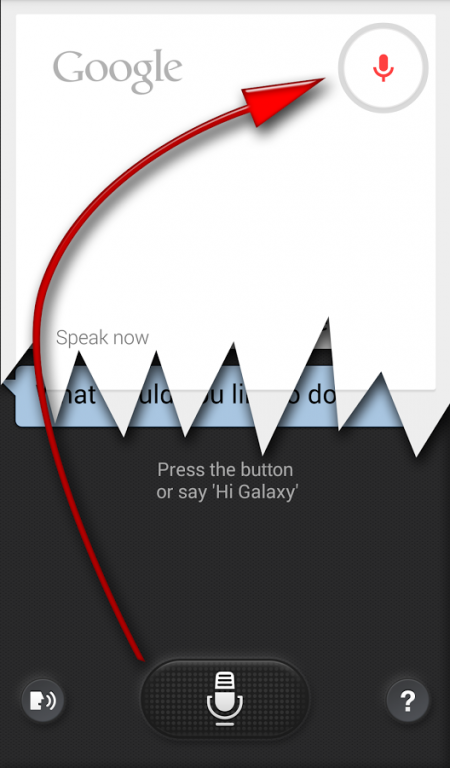
- No root necessary
(does not work with security locks, including finger ID on the S5, see FAQ section for a possible solution)
References:
►going towards 100,000 installs!
►c|net video: http://www.cnet.com/videos/start-google-now-with-your-voice-on-the-note-3
►c|net article: http://www.cnet.com/how-to/start-google-now-with-your-voice-on-the-galaxy-note-3/
►Daily Note II/3: http://youtu.be/VcChz_Bs0B4
If you can't get my app to work: before leaving negative reviews...
►please see FAQ at http://sfsv.dataglobe.eu
►write to dev's email: dyna.logix.hu@gmail.com
I respond quickly. We have solved many problems (usually with the Samsung software and not my app) If you can't get your phone to wake to your voice w/o my app, neither Free nor Pro will fix it :-( Try Free before buying Pro
S5 owners: enable car mode for voice wake up to work. Now switching from Drive Link too!
►Dear disappointed users, Please don't rate my app low because voice wake-up doesn't work on your device. My app has little to do with that, it's a decision of Samsung and/or your carrier. It's more practical to express our frustration over this towards them → maybe they will change it in an update.
Your Galaxy Note 3 or S5 does always listening voice wake-up similar to the advertised "Okay, Google Now" Motorola Touchless Control on the Moto-X → Moto Voice
Differences:
►#1 Say "Hi Galaxy" (while the screen is off)
►#2 SVoice will try to service you, which is much less capable than Google Now
No way to fix #1 on Note3 (you can set your own command on S5,Note4), but #2 can be solved with my little app: whenever S Voice would start, you are redirected to Google Voice Search
How to set up (see video)
0►Before install: start Samsung S Voice
1►MENU / Settings
2►enable "Voice wake-up"
3►[optionally enable "Open via the home key"] (S5,Note4: long press HOME for Google)
4►test if your phone can wake to your voice
5►install this app S for Switch Voice
6►open it
7►Lollipop (Android 5.0) enable Accessibility Service!!!
8►activate: ON (top right)
9►click checkmark
Pro benefits:
►You get to support an independent app developer who is devoted to apps which put YOU in control
►All premium features of Bubble Cloud Widgets get unlocked if SfSV Pro is installed → http://goo.gl/0PzVQi
►The app Extra Time® is included in Pro version for free! → http://goo.gl/7GVJWJ
►Option to hide notification icon
►Stays enabled at the end of the *week* The free version has a reminder built in, it needs to be re-enabled on every Sunday morning
►Offline announce mode: Instead of Google Voice Search, you can have the phone announce pre-selected information, when you wake it up by saying "Hi Galaxy". It's convenient when offline, when either S Voice or Google Search could do little. Select Offline announce mode in Settings, or have it auto enable while offline.
It can announce: time, battery or any notification using the app Touchless Notifications http://goo.gl/bXVWFB I used this mode while doing sports, I could just say "Hi Galaxy" (or "Time Galaxy") to hear the time from the phone in my pocket.
Frequently Asked Questions
►Phone doesn't wake to "Hi Galaxy"
►Device Admin? I cannot uninstall!
►How to wake Galaxy S5 using voice?
►Does it work if I use Security lock (pattern/pin/fingerprint)?
►Does it work with S Cover? Gear?
►Hiding the notification (icon)?
►"Hi Galaxy" when the screen is on?
►What is Offline Announcement mode? Touchless Notifications?
►Impact on the battery?
►Home2Shortcut?
►What's the eye icon?
:
Answers at dev's page: http://sfsv.dataglobe.eu
Permissions:
►NETWORK►WIFI=offline detection
►KEYGUARD=persistent notification keep in RAM
►SETTINGS=Extra Time
About S for Switch Voice Free
The company that develops S for Switch Voice Free is DYNA Logix. The latest version released by its developer is 2.72.
To install S for Switch Voice Free on your Android device, just click the green Continue To App button above to start the installation process. The app is listed on our website since 2015-03-08 and was downloaded 0 times. We have already checked if the download link is safe, however for your own protection we recommend that you scan the downloaded app with your antivirus. Your antivirus may detect the S for Switch Voice Free as malware as malware if the download link to hu.viczian.deathtosvoice is broken.
How to install S for Switch Voice Free on your Android device:
- Click on the Continue To App button on our website. This will redirect you to Google Play.
- Once the S for Switch Voice Free is shown in the Google Play listing of your Android device, you can start its download and installation. Tap on the Install button located below the search bar and to the right of the app icon.
- A pop-up window with the permissions required by S for Switch Voice Free will be shown. Click on Accept to continue the process.
- S for Switch Voice Free will be downloaded onto your device, displaying a progress. Once the download completes, the installation will start and you'll get a notification after the installation is finished.
Program Details
System requirements
Download information
Pricing
Version History
version 2.72
posted on 2015-03-08
Trouble? See extensive FAQ on Dev's site ↓↓,↓,Disclaimer: this is a hack, if Samsung had given us the choice, we wouldn't need apps like this. Pls don't down-rate if doesn't work for you,↓,2.72 Lollipop compatibility (IMPORTANT - NEW: Enable Accessibility Service!),:,2.70 PRO became even more valuable: it now unlocks Bubble Cloud Widgets premium features → http://goo.gl/0PzVQi,↓,Keep "Back→Home" delay=0 unless trouble backing out of Google,↓,Initial setup → http://sforswitchvoice.viczian.hu#best
version 2.72
posted on 2015-03-08
Disclaimer
External Download
We do not host S for Switch Voice Free on our servers. We did not scan it for viruses, adware, spyware or other type of malware. This app is hosted by Galad and passed their terms and conditions to be listed there. We recommend caution when installing it.
The APK Download link for S for Switch Voice Free is provided to you by apps112.com without any warranties, representations or guarantees of any kind, so access it at your own risk.
If you have questions regarding this particular app contact the publisher directly. For questions about the functionalities of apps112.com contact us.
